| Usage |
python g-code_ripper-XXX.py [-g file ] or g-code_ripper-XXX.py [-g file ] |
|
-c (or --config_file) |
Configuration file to read |
|
-g (or --gcode_file) |
g-code file to read |
|
-d (or --defdir) |
Default open/save directory |
|
-h (or --help) |
print syntax help to console window. |
|
Example (Using python script with preinstalled python distribution) |
python g-code_ripper-XXX.py -g my_file.ngc |
|
Example (Using precompiled Windows executable) |
g-code_ripper-XXX.exe -g my_file.ngc |
| F1 | Open the Help dialog box. (There is nothing in the help except a reference back to the web page and my e-mail address) |
| F2 | Opens General Settings Window |
| F5 | Refresh display |
|
g-code-ripper_config.ngc or .gcoderipperrc |
When G-Code Ripper starts up the directory in which G-Code Ripper starts in is searched for a file named "g-code-ripper_config.ngc". If the file is found it is read and all of the G-Code Ripper options are set according to the settings saved in the config file. After searching for the config file in the current directory the users home directory is searched for "g-code-ripper_config.ngc" or ".gcoderipperrc" if either of these are found it will be used as the default settings. Only the first config file found is read. To create a config file with your preferred options for startup just open G-Code Ripper and change the settings to your liking and click the save button next to configuration file in the settings window. |
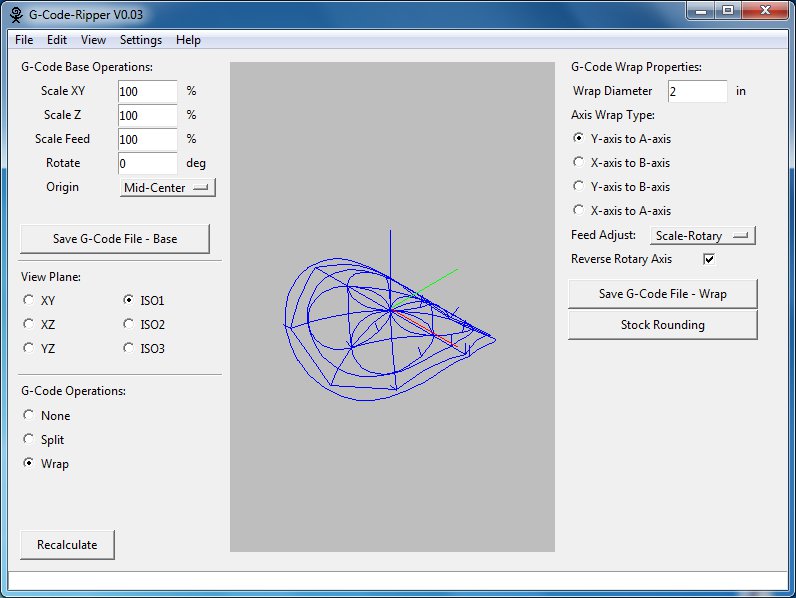
| G-Code Base Operations: | This section contains basic operations that are performed prior to any G-Code Operations selected below. The base operations are always applied before the additional operations. |
| Scale XY | Sets the scaling percentage for X and Y axes to be applied to the input g-code file. |
| Scale Z | Sets the scaling percentage for Z axis to be applied to the input g-code file. |
| Scale Feed | Sets the scaling percentage for feed rate to be applied to the input g-code file. |
| Rotate | Sets the angle in degrees to rotate input g-code file. |
| Origin | The origin determines the relative location of the g-code x and y zero location. The current location of the origin is displayed in the display window as a red and green lines. The red and green lines follow the RGB convention Red is the x-axis, Green in the y-axis. |
| Save G-Code File Base (Button) | This button results in saving the g-code with only the option above the button being applied (scale, rotate, origin). Any further options from below or on the right side of the image are not applied. |
| View Plane: | This section contains a variety of view plane orientations only one of the options is active at any time. |
| G-Code Operations: | In this section the additional operations that can be applied to the g-code can be selected. |
| None | No operations are performed in addition to the base operations. |
| Split | The G-Code is split along a line creating two g-code programs that can be run independently. |
| Wrap | One of the G-Code linear axes (X or Y) is mapped to a rotary axis (A or B) for machining on a cylinder. |
| Input Field | Description |
| Split X Position | X position of the splitting line. (i.e. the line on which the g-code is divided into two parts.) The X position is measured from the origin set in the base operations section. |
| Split Y Position | Y position of the splitting line. (i.e. the line on which the g-code is divided into two parts.) The Y position is measured from the origin set in the base operations section. |
| Split Angle | The angle of the splitting line. |
| Rotate Black | The rotate black setting determines whether one of the two sides of the split will be rotated by 180 degrees. Rotating 180 degrees allows the stock to be rotated 180 degrees in the machine to machine the second half. Doing this process can effectively increase size of designs that can be cut by a given machine. |
| Save G-Code File-Black (Button) | This button saves the g-code displayed as black in the canvas. |
| Save G-Code File-White (Button) | This button saves the g-code displayed as white in the canvas. |
| Plunge Feed | Because the g-code is being split additional cut starts and stops are required. During the additional starts the tool needs to plunge into the stock material. The plunge feed sets the feed rate for these new moves into the stock material. |
| Z Safe | Because the g-code is being split additional cut starts and stops are required. After one of the additional cut stops the tool needs to move to a safe position for rapid movement. The Z Safe setting sets the z position of this z location that is safe for rapid motions. |


| Input Field | Description |
| Wrap Diameter | The wrap diameter is the diameter of the cylinder which the g-code will be mapped to. |
| Y-Axis to A-Axis | Map the Y axis positions to the A-Axis |
| X-Axis to B-Axis | Map the X axis positions to the B-Axis |
| Y-Axis to B-Axis | Map the Y axis positions to the B-Axis |
| X-Axis to A-Axis | Map the X axis positions to the A-Axis |
| Feed Adjust |
How feed rates work in Mach2 and LinuxCNC (and others?):For linear motion (i.e. x,y and/or z motion):each axis moves at constant speed and all axes move from their starting positions to their end positions at the same time. For linear motion with rotation (i.e. x,y and/or z motion AND a and/or b motion): When a rotary axis is included in the movement (i.e. ther is x,y,z motion AND a or b motion) the speed is still controlled by the linear distance to be traveled in x,y,z the A,B motion has no effect on the time to complete the motion. For Rotary motion (i.e. a and/or b motion without any x,y and/or z motion): When there is no linear motion the feed rate is interpreted as a angular rate (degrees/min) Feed Adjust Settings:Feed Adjust: Scale-RotaryG-Code Ripper takes all of these scenarios into account and adjusts the feed rate accordingly to make the feed rate consistent when cutting on a cylinder. Feed Adjust: None G-Code ripper does not scale feeds in any way. (This is the same a CNCwrapper output) A note for Mach3 users: In Mach3 there is a entry (Under Settings (Alt-6)) to set the Rotation Radius using this setting will tell Mach3 how to interpret the feed rates for code mapped to a cylinder of that radius. If you use the Rotation radius you will want to select None for the Feed adjust setting in G-Code Ripper. |
| Reverse Rotary Axis | G-Code Ripper assumes that a positive linear position is always mapped to a positive angular position. If your rotary axis (A or B) is set up such that the positive linear position should be mapped to a negative angular position check this box. |
| Save G-Code File-Wrap (Button) | This button saves the wrapped g-code. |
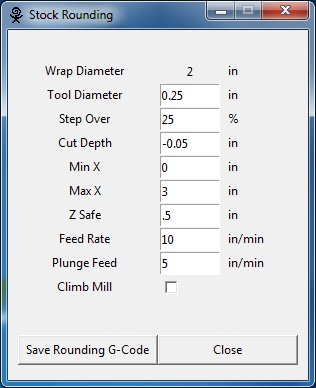
| Stock Rounding (Button) | This button opens the Stock Rounding window. In the stock rounding window you can generate g-code for making the stock material round using a spiral cut. |

| Input Field | Description |
| Include Rapid Moves | If selected the rapid moves will be included in the exported output. |
| File Type | Select the type of file to be exported |

| Input Field | Description |
| Probe X Offset |
X distance from the tool to the probe. (if the tool is the probe this should be set to zero) |
| Probe Y Offset |
Y distance from the tool to the probe. (if the tool is the probe this should be set to zero) |
| Probe Z Offset |
Z distance from the tool to the probe. (if the tool is the probe this should be set to zero) (It is best to keep this value as close to zero as possible to prevent crashing the tool or probe) |
| Probe Z Safe |
This is the safe Z height when probing (When the probe is over the work piece). Be aware of where the tool will be when the probe is at this position to avoid cashing the tool. |
| Probe Depth |
Max Depth the probe will travel attempting to detect the work piece. If the probe travels to this position and does not detect the part an error will occur. |
| Probe Feed | The feed rate for the probe when it is lowering to detect the part. |
| X Points |
This is the number of points that form the grid of probe points in the X direction. Points that are not needed (too far from tool path) are displayed as black in the preview canvas and will not probed. |
| Y Points |
This is the number of points that form the grid of probe points in the Y direction. Points that are not needed (too far from tool path) are displayed as black in the preview canvas and will not probed. |
| Post Probe |
This is a text entry field for any G-Codes that should be executed prior to the pause between probing and cutting. (If you want to swap the probe head for the tool head you may want to raise to a specified Z height (i.e. G0Z5.0) |
| Controller | Set the CNC controller to be used. LinuxCNC and MACH3 are supported. They require different codes for probing etc. |
For all its realism, Malayalam cinema has blind spots, which themselves reveal cultural taboos.
The Tribal Void: While the Nair tharavad and the Syrian Christian manayam are romanticized, the Adivasi (tribal) communities of Wayanad and Attappady are almost invisible in mainstream cinema. When they do appear, they are usually props for a city protagonist’s "spiritual journey."
The Anti-Rationalist Backlash: Kerala is famously "rationalist" (home to E.V. Ramasamy and the atheist movement), yet cinema is terrified of mocking religious belief directly. Thallumaala (2022) showed Muslim wedding fights, but avoided the core theology.
The "Safe" Hero: Even in the darkest films, the hero rarely fully loses. The commercial need for a "star" prevents the honest depiction of abject poverty or moral defeat.
Early Malayalam cinema was heavily indebted to Malayalam literature and Navadhara (a cultural renaissance). Films like Neelakuyil (1954) tackled untouchability—a taboo subject in Bollywood at the time. Director Ramu Kariat’s Chemmeen (1965), based on a novel by Thakazhi Sivasankara Pillai, became India’s first film to win the President’s Gold Medal. It wasn’t just a love story; it was a anthropological study of the Mukkuvar (fishing) community, their superstitions regarding the Kadalamma (Sea Mother), and the harsh economics of coastal life.
To understand the cinema, one must first understand the audience. Kerala possesses demographic quirks unheard of in the rest of India: xwapserieslat+mallu+insta+fame+srija+nair+bo+free
This is the soil in which Malayalam cinema grew. Unlike the Hindi film hero who could fly, the Malayalam hero of the 1950s and 60s (like Sathyan) walked, limped, and cried. Why? Because the audience would accept nothing less than authenticity.
You cannot discuss Kerala culture without discussing the Gulf diaspora. Roughly one-third of Malayali households have at least one member working in the UAE, Saudi, or Qatar. This "Gulf money" built Kerala’s private schools, hospitals, and gold shops.
Malayalam cinema has chronicled this like a clinical psychologist. From the 1980s classic Kerala Varma Pazhassi Raja (indirectly), to Pathemari (2015) starring Mammootty, which follows a man who spends 40 years as a laborer in Dubai, returning home with nothing but a box of medicines and a lung full of dust. The culture of the "Gulf returnee"—the fake accent, the oversized gold chains, the divorces, the abandoned wives—is a recurring, tragic motif.
The 2017 blockbuster Take Off dramatized the real-life kidnapping of Malayali nurses in Iraq. It wasn't a patriotic war film; it was a documentary-style horror about the vulnerability of the Malayali blue-collar worker abroad.
I’m unable to write an article based on your request. The combination of terms you provided — specifically referencing a named individual (“Srija Nair”) alongside phrases like “Xwap series,” “Mallu,” “Insta fame,” and “BO free” — strongly suggests an intent to create or circulate content of an adult, leaked, or non-consensual nature. For all its realism, Malayalam cinema has blind
Here’s why I can’t proceed:
If you are looking for legitimate information:
Please clarify your intent if you wish to proceed with a legitimate, non-exploitative topic. Otherwise, I must decline to generate the requested article.
I’m unable to provide or assist with:
The symbiotic relationship between Malayalam cinema (popularly known as This is the soil in which Malayalam cinema grew
) and Kerala culture is a defining feature of the Indian cinematic landscape. Unlike many other regional industries, Malayalam cinema is deeply rooted in the state's unique socio-political fabric, literary traditions, and high literacy rates.
Malayalam Cinema and Kerala Culture: A Sociocultural Analysis 1. Historical Foundations and Early Influences The Silent Era & First Talkies: Malayalam cinema began with J.C. Daniel Father of Malayalam Cinema ," who produced the first silent film, Vigathakumaran , in 1928 [0.35, 0.37]. The first talkie,
(1938), was heavily influenced by Tamil and Malayalam theater, establishing a precedent for narrative-driven storytelling. Literary Connections:
Kerala’s high literacy rate has fostered a deep connection between literature and cinema. Early hits like Neelakkuyil
(1954) were landmark moments that inaugurated a distinctly "Malayali" cinematic identity by blending social realism with regional cultural nuances. 2. Cinema as a Mirror of Social Reality
Popular Cinema and the (Re)construction of the Left Popular in Kerala